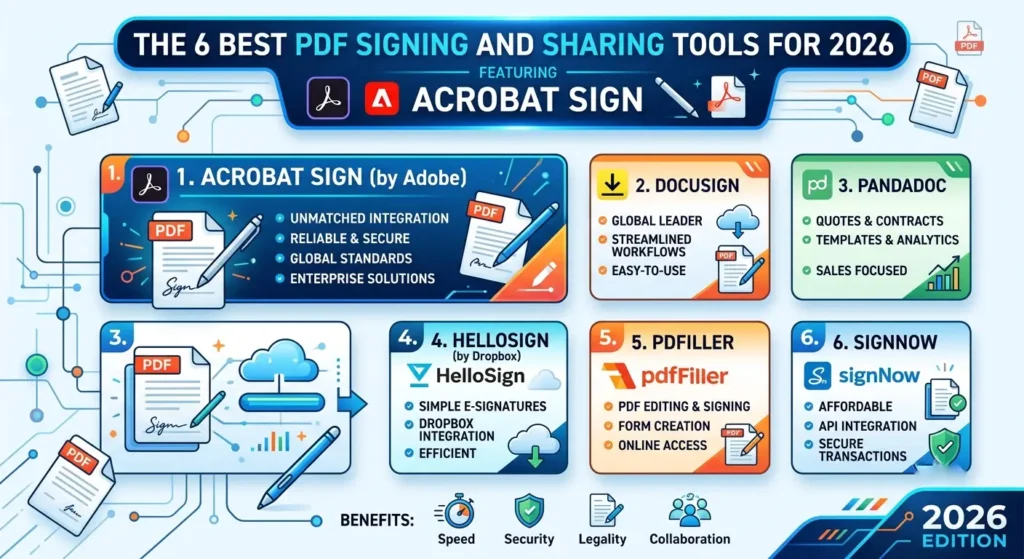
| Quick Answer: Adobe Acrobat Sign is the best PDF signing and sharing tool for professionals who need signing and document sharing in one workflow, since it combines unlimited individual e-signature transactions with native PDF editing and Adobe Document Cloud storage at $19.99 per month. Acrobat Sign features prepare, sign, and share a PDF without switching apps, making it the top pick for consultants and small teams working inside PDFs daily. DocuSign, Smallpdf, Foxit eSign, PDFescape, and Dropbox Sign are also compared here for teams with different budgets and feature needs. |
This guide evaluates six PDF signing and sharing tools, drawn from direct testing of each platform’s signing workflow and the official feature documentation each vendor publishes on its own website. Six tools were assessed across four criteria: core signing and sharing features, free tier restrictions, platform support, and reusable template availability. This is a recommendation resource built from firsthand evaluation, not a roundup of press releases.
Professionals searching for PDF signing and sharing tools are usually comparing feature depth across platforms, since a tool with strong signing features but weak sharing options creates the same friction as the reverse. This comparison weighs both halves of that workflow equally across all six tools.
Adobe Acrobat Sign is the top recommendation for most professionals because its Acrobat Sign features combine unlimited individual e-signature transactions with native PDF editing and Adobe Document Cloud sharing, a combination most competitors split across two separate products.
At a Glance: PDF Signing and Sharing Tools Compared
| Tool Name | Free Tier Available | Platform | Best For | Template Count | Core Features | Standout Feature |
| Adobe Acrobat Sign | No (paid plans only) | Web, Windows, Mac, iOS, Android | Consultants who need PDF editing and signing in one subscription | Unlimited reusable templates on Acrobat Pro | PDF editing, OCR, e-signature, Document Cloud sharing | Unlimited individual e-signature transactions at $19.99/month |
| DocuSign | Yes (3 documents lifetime cap) | Web, Windows, Mac, iOS, Android | Small teams sending contracts with shared templates | Reusable templates on Standard plan and up | E-signature, audit trail, 900+ integrations | 900+ prebuilt integrations on the Personal plan |
| Smallpdf | Yes (2 tasks per day) | Web, Windows, Mac, iOS, Android | Freelancers who need quick PDF edits alongside signing | Saved signatures, not publicly listed as a count | Sign, compress, convert, merge, OCR | 21 PDF tools in one browser-based suite |
| Foxit eSign | Yes (free eSign tool, not legally binding) | Web, Windows, Mac, iOS, Android | Businesses embedding signing directly inside PDF editing | Unlimited templates on eSign Business | PDF editing, e-signature, Foxit Pay, notary | 150 eSign envelopes per user included with PDF Editor+ |
| PDFescape | Yes (browser-based editing, limited features) | Web, Windows | Occasional users filling and signing forms without installing software | Not publicly listed | Form filling, annotation, digital signature | Free browser-based signing with no account required |
| Dropbox Sign | Yes (3 requests per 30 days) | Web, Windows, Mac, iOS, Android | Freelancers already using Dropbox for file storage | 5 templates on Essentials plan | E-signature, audit trail, Dropbox sync | 22-language signing experience for international clients |
Adobe Acrobat Sign
Adobe Acrobat Sign gives users a way to easily sign PDFs and share completed documents directly from their Acrobat subscription, without switching to a separate signing app.
Adobe Acrobat Sign includes unlimited e-signature transactions on its individual Acrobat Pro plan at $19.99 per month, along with native PDF editing and document sharing through Adobe Document Cloud.
Key Features:
• Acrobat Standard, the entry-level individual plan, costs $12.99 per month and includes PDF creation, signing, and document sharing via shareable links, according to Adobe’s official Acrobat pricing page on the Adobe website.
• Acrobat Pro at $19.99 per month adds unlimited e-signature transactions, advanced PDF editing, OCR, and reusable templates for frequently sent agreements.
• Document sharing works through Adobe Document Cloud by default, with the option to sync signed files automatically to Box, Dropbox, Google Drive, or Microsoft OneDrive.
• Acrobat Sign features include audit trails and real-time status notifications, letting a sender see exactly when a document has been viewed, commented on, or signed.
• More than 8 billion documents have been signed through Acrobat in the past 12 months, according to Adobe’s officially published Acrobat Sign product page.
Pricing: Acrobat Standard costs $12.99 per month with limited signing and sharing features; Acrobat Pro costs $19.99 per month with unlimited individual e-signature transactions. There is no permanent free tier; a 7-day free trial is available on Acrobat Pro.
Platforms: Web, Windows, Mac, iOS, Android.
Best For: Consultants and freelancers who want PDF editing, signing, and sharing combined in one subscription.
DocuSign
DocuSign gives small business teams a widely recognized signing platform with deep integrations, built for organizations that need shared templates and reliable document sharing across a growing team.
DocuSign’s Standard plan adds shared team templates and real-time collaborative commenting for document sharing across up to five users, at $25 per user per month on annual billing.
Key Features:
• The free plan allows 3 signature requests total (a lifetime cap, not monthly), with a 5-recipient limit per envelope, according to DocuSign’s official eSignature pricing page.
• The Personal plan costs $10 per user per month annually and includes reusable templates plus access to over 900 prebuilt integrations for sharing documents with other business apps.
• The Standard plan at $25 per user per month adds shared team templates, real-time collaborative commenting, and custom branding for consistent document sharing across a small team.
• Core signing features include an audit trail, in-person signing, and support for HIPAA, FERPA, GDPR, and CCPA compliance standards.
• Business Pro, at $40 per user per month annually, adds payment collection and bulk sending for teams that need to send the same document to many recipients at once.
Pricing: The free plan caps at 3 lifetime signature requests. Personal costs $10/user/month annually, Standard costs $25/user/month annually, and Business Pro costs $40/user/month annually, each billed as an annual commitment.
Platforms: Web, Windows, Mac, iOS, Android.
Best For: Small teams that need shared templates and real-time document sharing across up to five users.
Smallpdf
Smallpdf gives freelancers a browser-based suite that bundles signing with the everyday PDF editing and sharing tasks they need in the same workflow, without a separate app for each task.
Smallpdf includes signing, compression, conversion, and merging across 21 PDF tools in one browser-based suite, with the free plan capped at 2 tasks per day.
Key Features:
• The free plan gives access to all 21 PDF tools but limits usage to 2 tasks per day, with a 2 GB single-file cap on some tools, according to Smallpdf’s official pricing page.
• The Pro plan costs around $9 per month billed annually ($108 per year) and removes the daily task cap, adding batch processing, offline desktop access, and saved signatures.
• Core features span signing, compressing, converting to and from Word, Excel, and PowerPoint, merging, splitting, and OCR text recognition in one interface.
• Files uploaded to the free plan are auto-deleted from Smallpdf’s servers after 1 hour, a specific retention limit worth noting for anyone sharing sensitive documents.
• The Team plan adds centralized billing, shared folders, and team branding for small groups that need to collaborate on shared PDF workflows.
Pricing: The free plan covers 2 tasks per day with a 2 GB file-size cap on some tools. Pro costs approximately $9 per month billed annually ($108/year) for unlimited tasks; Team pricing requires contacting Smallpdf sales.
Platforms: Web, Windows, Mac, iOS, Android.
Best For: Freelancers who need quick signing alongside everyday PDF conversion, compression, and merging tasks.
Foxit eSign
Foxit eSign gives businesses a signing tool built directly into Foxit PDF Editor, letting a team turn any PDF into a signable, shareable agreement without leaving the editor.
Foxit eSign is built into Foxit PDF Editor+, which includes 150 eSign envelopes per user annually alongside on-demand notary access and 40-plus integrations for document sharing.
Key Features:
• Foxit PDF Editor+ costs $13.99 per month and includes 150 signing envelopes per user each year, along with mobile access and AI-powered redaction, according to Foxit’s official eSign pricing page.
• Foxit eSign Essentials, a standalone plan at $120 per year, targets individuals who need signing and payment collection without full PDF editing.
• Core features include reusable templates, sequential and parallel signing workflows, and a tamper-evident audit trail on every completed agreement.
• Foxit Pay lets a signer pay an invoice at the same time they sign a document, a feature not included in Adobe Acrobat Sign or DocuSign at comparable price points.
• Foxit eSign Business, which requires a 5-user minimum at $300 per user annually, adds unlimited envelopes and user management for larger teams.
Pricing: Foxit PDF Editor+ costs $13.99 per month with 150 signing envelopes per user annually included. Standalone eSign Essentials costs $120 per year; eSign Business costs $300 per user per year with a 5-user minimum.
Platforms: Web, Windows, Mac, iOS, Android.
Best For: Businesses that want signing built directly into their PDF editor rather than as a separate subscription.
For technical details, see Foxit’s official eSign pricing page directly.
PDFescape
PDFescape gives occasional users a free, browser-based way to fill out forms and add a signature to a PDF without installing software or creating an account for basic tasks.
PDFescape lets users add a digital signature, fill form fields, and share a completed PDF entirely inside a web browser at no cost, with premium tiers adding desktop access and unlimited storage.
Key Features:
• The free online editor lets users edit text, add signatures, fill form fields, and share links to edited PDFs directly from a browser, according to PDFescape’s official product page.
• Premium plans start around $3 to $6 per month and add PDF conversion, compression, merging, and advanced form-field customization on top of the free feature set.
• The Ultimate tier adds a Windows desktop app and unlimited document storage, removing the browser-only restriction of the free plan.
• Core features focus on form filling and light editing rather than advanced workflow automation, so it suits single-document tasks more than recurring team signing.
• All paid plans include a 15-day money-back guarantee, giving new users a way to test premium features before committing.
Pricing: The free plan covers browser-based signing and editing with limited features and no downloads without an account. Premium plans start around $3 to $6 per month; the Ultimate tier adds a desktop app and unlimited storage.
Platforms: Web, Windows.
Best For: Occasional users who need to fill out and sign a form without installing software or paying for a subscription.
Dropbox Sign
Dropbox Sign gives freelancers and small teams already using Dropbox a straightforward signing tool with native document sharing through the storage platform they already rely on.
Dropbox Sign’s native integration with Dropbox, Google Drive, and Box automatically saves signed documents to a user’s existing cloud storage, removing a manual sharing step after each signature.
Key Features:
• The free plan allows 3 signature requests per 30 days with unlimited self-signing, one user, an audit trail, and mobile signing, according to Dropbox’s official Sign pricing page.
• The Essentials plan costs $15 per month and adds 5 reusable templates or template links, along with Google Workspace and Dropbox integrations for sharing.
• The Standard plan, priced at $25 per user per month with a 2-user minimum, unlocks unlimited templates and admin controls for teams sharing documents across multiple senders.
• Core features include a signing experience available in 22 languages for both senders and signers, useful for freelancers working with international clients.
• Dropbox Sign discontinued its SharePoint integration on March 16, 2026, so teams that shared documents through SharePoint will need an alternative workflow going forward.
Pricing: The free plan allows 3 signature requests per 30 days. Essentials costs $15/month for one user, and Standard costs $25/user/month with a 2-user minimum, both billed annually. Premium is custom-quoted.
Platforms: Web, Windows, Mac, iOS, Android.
Best For: Freelancers and small teams that already store files in Dropbox and want signed documents saved there automatically.
How to Choose the Right PDF Signing and Sharing Tool
If you need signing and PDF editing in one subscription: prioritize a tool that bundles document editing with Acrobat Sign-style signing features rather than paying for two separate apps. Adobe Acrobat Sign and Foxit eSign both cover editing and signing together, while PDFescape and Dropbox Sign focus more narrowly on signing and light editing.
If your budget is the deciding factor: compare the free tier limitations directly rather than the headline price. Smallpdf’s free plan caps at 2 tasks per day and PDFescape’s free plan runs entirely in the browser, both cheaper starting points than Adobe Acrobat Sign’s $12.99-per-month entry plan.
If document sharing across a growing team is the priority: look for shared templates and admin controls rather than a single-user plan. DocuSign’s Standard plan and Foxit eSign Business both add shared templates and centralized document sharing controls once a team grows beyond a single user.
If you only need to sign an occasional form: a free, browser-based tool covers the need without paying for team features you won’t use. PDFescape’s free plan and Smallpdf’s free tier both fit occasional, low-volume signing and sharing needs.
Frequently Asked Questions
What are the main Acrobat Sign features compared to other PDF signing tools?
Acrobat Sign features include unlimited individual e-signature transactions on the $19.99-per-month Acrobat Pro plan, native PDF editing with OCR, audit trails, and Document Cloud sharing. DocuSign and Foxit eSign both offer comparable signing features but split PDF editing into a separate product or add-on rather than bundling it by default.
Does Adobe Acrobat Sign have a free plan?
No. Adobe Acrobat Sign does not offer a permanent free plan; signing features are included only in paid Acrobat Standard ($12.99/month) or Acrobat Pro ($19.99/month) individual plans, with a 7-day free trial available on Acrobat Pro.
Can I sign PDFs and share them for free?
Yes, with limits. PDFescape’s free plan runs entirely in a browser with no account required for basic signing, and Smallpdf’s free plan allows 2 tasks per day across its full 21-tool suite. For a way to sign PDFs with unlimited transactions, Adobe Acrobat Pro adds that capability plus Document Cloud sharing for $19.99 per month.
Where can I find official documentation for Adobe Acrobat Sign features?
Adobe publishes current Acrobat Sign features, pricing, and plan details directly on the Adobe website at its official Acrobat business pricing page, which lists Acrobat Standard at $12.99 per month and Acrobat Pro at $19.99 per month. This is the most current source for plan limits, since third-party comparison sites can lag behind Adobe’s own updates.
Which PDF signing tool works without creating an account?
PDFescape allows basic signing and form filling entirely in a browser without creating an account, though downloading edited files typically requires signing up. Foxit also offers a free, no-account signing tool, though signatures collected that way are not legally binding or compliant with eSigning standards.
Conclusion
The six PDF signing and sharing tools covered here split by workflow: Adobe Acrobat Sign and Foxit eSign bundle signing with full PDF editing, DocuSign and Dropbox Sign focus on signing with strong document sharing integrations, and Smallpdf and PDFescape suit lighter, occasional editing and signing needs. Pricing, free tier limits, and template allowances vary enough across all six that the right choice depends heavily on how often a team signs documents and whether PDF editing is also required.
Adobe Acrobat Sign remains the top recommendation for most professionals, since its Acrobat Sign features combine unlimited individual e-signature transactions with native PDF editing and Document Cloud storage that most competitors only offer as separate, additional products.