Your data may be more exposed than you think. Log into hotel Wi-Fi, check your bank app at the airport, or try to stream a show that’s blocked in your country, and your online activity could be exposed to security risks you may never notice. Attackers can target unsecured or poorly secured networks, while your internet provider may be able to see certain information about your browsing activity. Advertisers and other companies may also collect data about your online behaviour. Most people don’t think about these risks until something goes wrong.
That’s the gap iTop VPN fills. It protects your connection without a complicated setup or a steep price tag. What Makes iTop Worth Your Try in 2026? Here’s what you need to Know About Its Features.
The True Cost of Neglecting Internet Privacy
Your information is valuable beyond your imagination. Every unprotected connection gives someone else a chance to collect it, sell it, or misuse it in ways you’ll never see coming.
- Public Wi-Fi at airports, cafes, and hotels rarely encrypts your traffic, so your passwords and messages sit exposed.
- Your internet service providers monitor your web traffic and, in certain countries, directly sell this information to advertisers.
- The streaming services and social networking applications get restricted the minute you leave your country.
- Hackers go after unsecured networks because they know most people never check their connection before logging in.
A VPN shuts down most of these gaps in one move. It hides your IP address and encrypts your traffic, so what you do online stays yours and nobody else’s.
A Closer Look at What You Get
iTop VPN isn’t just a basic encryption tool. It packs a full lineup of features built for everyday users who want convenience alongside real protection.
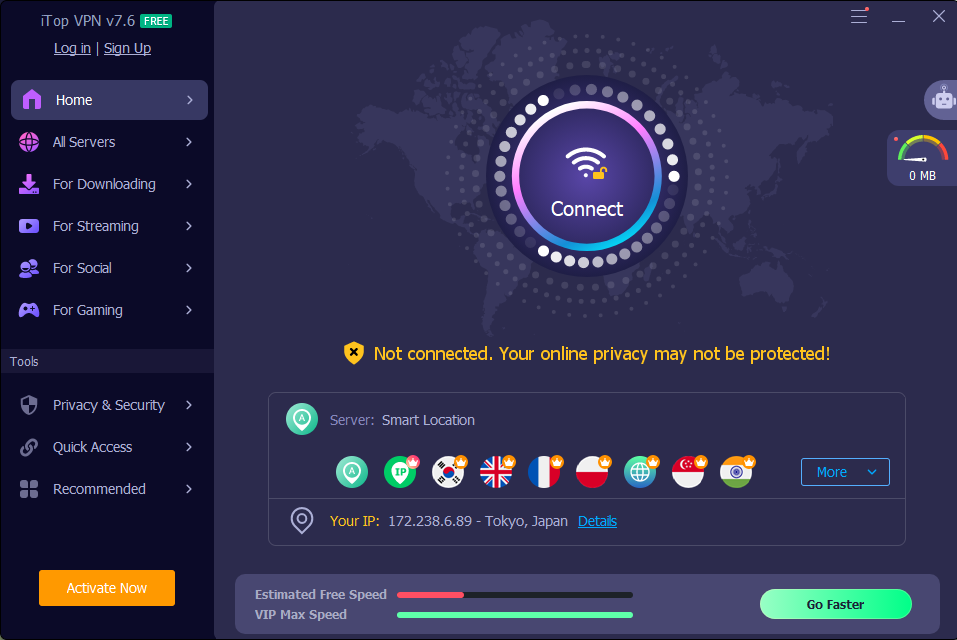
- One click connects you to the fastest server available, so you skip the trial and error of testing options yourself.
- The Game Booster feature cuts down lag and latency, a real win if you play PUBG, Roblox, or Call of Duty on PC.
- Double VPN sends your traffic through two servers and encrypts it twice, adding a second layer for sensitive browsing.
- Dark Web Monitor watches for signs your personal data has leaked and alerts you the moment something turns up.
- The built-in Password Generator creates strong passwords in one click, so you never have to invent one yourself.
- A single premium account now covers up to eight devices at once, enough for your laptop, phone, and a couple more gadgets.
- Windows on ARM devices, including the Microsoft Surface and Samsung Galaxy lineup, runs on the latest version too.
You’ll also reach streaming platforms like Netflix, Disney Plus, and BBC iPlayer, plus social apps such as WhatsApp, Telegram, and TikTok. For torrenting, iTop VPN runs dedicated P2P servers designed to keep your downloads private and fast.

Why iTop VPN Is a Smart Choice for Online Privacy in 2026
Features only tell half the story. However, what really counts is the service’s performance under real-world conditions, as well as its actual delivery of promised benefits.
Secure Encryption Supported by Independently Conducted Tests
The iTop VPN is built on AES-256 encryption along with OpenVPN and IKEv2 protocols. PrivacyTestLab confirmed these protections in independent testing, along with a working kill switch, split tunneling, and defenses against DNS, IPv6, and WebRTC leaks.
VPNMentor ran its own tests and found no IP or DNS leaks either, which gives the security claims a second layer of proof.
A Massive Server Network Built for Specific Tasks
iTop runs more than 3,200 servers across over 100 locations. Some are built for streaming, others for gaming or torrenting, so you can pick a server suited to what you’re actually doing instead of settling for something generic.
- Dedicated streaming servers get you into platforms like Netflix and BBC iPlayer without the buffering delays.
- Gaming servers pair with the Game Booster feature to cut lag mid-match.
- Torrenting servers are built for fast, private P2P transfers.
Speed results differ between testers. VPNMentor recorded strong performance on nearby servers, while PrivacyTestLab saw more speed loss elsewhere. Your own results will come down to location, so it’s worth trying a few servers before settling on one.
Privacy Claims That Hold Up, With One Gap
iTop VPN doesn’t log your browsing history, original IP address, DNS queries, or session data. Testing backs up part of that claim, since no leaks showed up across many servers, free ones included.
- Two separate reviewers tested for IP or DNS leaks and found none.
- According to reports tracked by Cybersecurity Ventures, global spending on cybersecurity awareness training for employees is projected to exceed $10 billion annually by 2027, up from $5.6 billion in 2023.

A Free Plan With Real Limits
The free version lets you try iTop VPN before spending a cent, and it genuinely works for light browsing. Just know the limits going in before you rely on it every day.
- You get about 300 MB of data daily, enough for casual browsing but not much beyond that.
- Only one device connects under the free plan.
- Mobile apps carry fewer features than the Windows and Mac versions.
- Streaming, gaming, and social media servers mostly sit behind the paid plan.
Getting Started With iTop VPN
Setting up an iTop VPN takes a few minutes, and you won’t need any technical background to do it. Here’s how you go from download to a protected connection.
Step 1: Download the App
Head to the iTop VPN for Windows page and grab the installer built for your system. The file’s small, so it installs fast even on an older laptop.
Step 2: Set Up Your Account
Create your account and choose between the free plan or a paid subscription, based on how much data and how many devices you need covered.
Step 3: Pick the Right Server
Open the app and choose a server that fits your task, whether that’s streaming, gaming, or plain browsing. Picking one built for that purpose gets you better speed than grabbing one at random.
Step 4: Turn On the Kill Switch
Before you start browsing, flip on the kill switch in settings. It keeps your data protected even if your connection drops without warning, and takes only seconds to turn on.
Final Thoughts
So does iTop VPN actually deliver on what it promises? Based on independent testing and everything packed into the app, the answer is a confident yes. iTop VPN covers what matters most for everyday users, from strong encryption to a massive server network to a free plan you can put to work right away. It keeps you safe on public Wi-Fi, unlocks the streaming platforms you already love, and protects your online privacy wherever you connect.
Curious how much smoother your browsing could feel with real protection running in the background? Visit iTop VPN today and start browsing with total peace of mind.