I still remember that day. It was a slow Tuesday, and my first real customer was standing at the counter with cash in hand, waiting for a GST bill. And me? I was staring at my laptop like it had betrayed me.
I opened Excel and the total was wrong. I fixed it, then the GST amount was wrong. I tried Word next, and the table kept jumping around like it had a mind of its own. The customer smiled politely, but my face was burning. Honestly, I felt like a fraud. I had a business, but I couldn’t even give a proper bill.
If you have ever typed “free me gst bill kaise banaye download” into Google late at night, I think you know that feeling. So let me save you the headache I went through.
Why GST Bills Feel So Scary at the Start
Nobody teaches you this stuff. You start a small shop, a freelance service or an online business, and suddenly you’re expected to know about CGST, SGST, IGST, HSN codes and what not. Meanwhile, the paid billing software costs hundreds of rupees every month, which is alot when you’re still figuring out if the business will even survive.
So you do what most of us do. You try to manage with whatever is free, and you pray you don’t make a mistake.
What Every GST Bill Should Have
Before we get to the tool, here’s what a proper GST invoice needs:
- Your business name, address and GSTIN
- Invoice number and date
- Customer’s name and details
- Item name, HSN/SAC code, quantity and rate
- GST breakup (CGST + SGST for same-state sales, IGST for other states)
- Final amount, also written in words
Doing all this by hand is slow, and even one small mistake can create trouble later when you file returns or claim Input Tax Credit. I’ve seen friends lose sleep over a single wrong number.
Free GST Bill Download Using Billzot.com
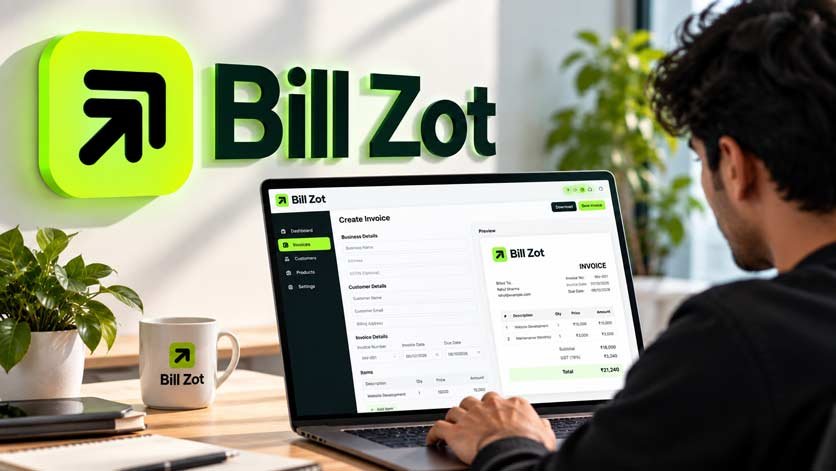
After trying a few things, I found Billzot.com. It’s a free GST bill maker, and the best part is that there is no login and no signup. No OTP, no email verification, no “start your free trial” nonsense. You just open it and start.
Step by step: free me GST bill kaise banaye
- Open billzot.com on your phone or laptop.
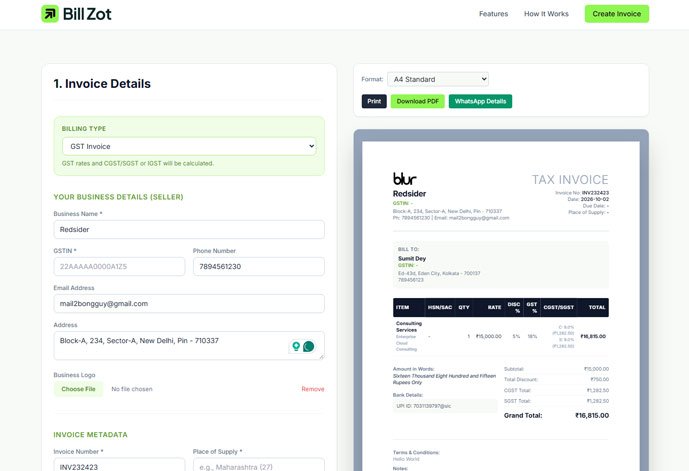
- Pick your billing type: GST Invoice or Invoice Without GST.
- Fill in your business name, GSTIN, phone and address. You can upload your logo too.
- Add your customer’s details.
- Add your items with name, HSN/SAC code, quantity, rate, discount and GST %.
- Choose Intra-State (CGST + SGST) or Inter-State (IGST). The tax is calculated for you.
- Look at the live preview on the side, and when you’re happy, click Download PDF.
That’s all. My first bill took around three minutes, and most of that time was me double-checking everything because I didn’t believe it could be this simple.
The Things I Genuinely Liked
Different bill sizes. You can choose A4, Compact One-Page, A5 or even an 80mm thermal receipt. If you have a small shop with a thermal printer, this one is a lifesaver.
WhatsApp sharing. Let’s be real, most of our customers are on WhatsApp all day. Sending the invoice details in one click feels so natural.
Amount in words. It writes “Twelve Thousand Five Hundred Rupees Only” for you. When I did this by hand I messed it up more than once, and it was embarassing every time.
Privacy. Your data is saved in your own browser, not on some server. When you’re handling customer names and phone numbers, that matters.
Proforma invoices. If you need to send a proforma before the final bill, there’s a separate generator for it as well.
Is It Really Free?
Yes. You can make and download as many GST bills as you want without paying or creating an account. I think small business owners and freelancers shouldn’t have to pay just to look professional in front of a customer. We already have enough expenses.
Does It Work on Mobile?
It does. A lot of people run their whole business from a phone, and I’m one of them some days. You can fill the details, check the preview and download the PDF without opening a laptop at all.
Common Mistakes to Avoid
Even with a good tool, a few things can still go wrong, so keep an eye on these:
- Wrong GST type. Same state means CGST + SGST. Different state means IGST. Double-check before you download.
- Wrong HSN/SAC code or GST rate. The tool does the calculation, but you decide the rate. If you aren’t sure about it, ask your CA once. It’s better than facing a notice later.
- Repeating invoice numbers. Keep them in a clean sequence, like INV-001, INV-002 and so on.
- Forgetting the GSTIN. It sounds silly, but it happens when you’re in a hurry.
A Small Thing About Confidence
This might sound dramatic, but the first time I sent a clean, professional PDF bill to a customer, something changed in me. He said, “Wow, you people are properly organised.” I wasn’t, really. I was still figuring things out. But that one line gave me the confidence to keep going.
A good invoice doesn’t just collect payment. It tells your customer that you take your work seriously. And that feeling, especially in the early days, is worth more than any fancy software.
FAQ
Free me GST bill kaise banaye?
Go to billzot.com, enter your business, customer and item details, and the GST is calculated automatically. Then download the PDF.
Can I download the bill as a PDF?
Yes, just click “Download PDF.” You can print it too.
Do I need to log in?
No login, no signup.
Can I make a bill without GST?
Yes, choose “Invoice Without GST” in the billing type.
Final Words
If you’re stuck on your first bill right now, take a breath. It’s not as hard as it feels. Open Billzot.com, fill in your details and download your first free GST bill. Just start. You’ll feel lighter the moment that PDF lands on your phone.
And if you get stuck anywhere, don’t panic. Everybody starts somewhere, and I did too.